 Fablum
What is OPDS?
OPDS is how a reading app talks to a book catalog. You meet it every time you open the catalog in Fablum, usually without noticing.
OPDS stands for Open Publication Distribution System. It is an open standard for publishing a catalog of books in a form another program can read: a feed of entries, each with a title, an author, a language, a cover and a link to the file itself. A reading app fetches that feed and draws it as a list of books. Nothing about it is specific to one shop or one app.
That is the whole idea. A web page about a book is written for a person; an OPDS catalog is written for software. Because the format is agreed, the app can do things a web page cannot: search inside the catalog, filter it, show covers in a grid, and hand a download straight to your library instead of to a browser’s downloads folder.
How it differs from a shop
A catalog is not a store. There is no basket, no checkout and no account: an OPDS entry is a description plus one or more download links, and the app follows the link. Libraries, archives and publishers of public-domain texts use it precisely because it needs no commercial machinery.
Nor is it a file format. EPUB and PDF are the books; OPDS is the index that points at them. Most catalogs are plain Atom or JSON over HTTP, which is why any reading app that speaks the standard can browse one without a plugin.
Where Fablum uses it
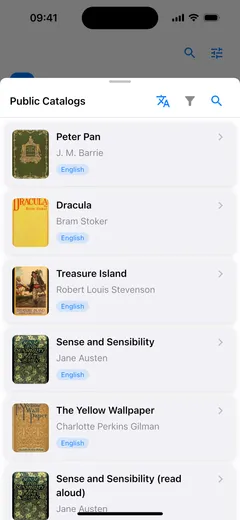
Fablum has one public catalog built in, and it is an OPDS catalog. Everything inside that sheet is the app reading an OPDS feed and acting on what it finds: the categories you move through, the search, the language and type filters, the download, the stream.
- 1
Open Fablum, tap + in your library and choose Public Catalogs. What opens is an OPDS catalog of public-domain books and audiobooks.
- 2
Search it, or use the language and type filters. Both are OPDS features: the app asks the catalog for a narrower feed and redraws the list.
- 3
Tap a book and download it. The entry's download link is fetched and imported, and the book opens offline from your library afterwards.
What the standard covers
An OPDS feed describes two things: navigation, the categories and shelves you move through, and acquisition, the entries that can actually be downloaded. An entry may offer several files (EPUB, PDF or an audiobook) and the app picks the one it can open. Search is part of the standard too, which is why a catalog can be searched inside the app rather than on a website.
The specification is public and maintained in the open at specs.opds.io; version 1.2 is the Atom-based one most catalogs still publish, and 2.0 is its JSON successor.
For the practical side of the same catalog, see how to find free ebooks.