Free catalogs inside your reader

OPDS Reader App - Browse Free Book Catalogs on Your Phone

Browse and download free ebooks from OPDS catalogs like Project Gutenberg directly on your iPhone or iPad. Fablum is an OPDS reader app for iOS with EPUB, PDF, and offline reading support.

Fablum is an OPDS reader app for iPhone and iPad that keeps catalog browsing inside the reading flow instead of kicking you out to a browser, a files app, or a sync service. If you want the quick product tour, start on the homepage. If you want the longer explanation of how OPDS works on a phone, why Project Gutenberg matters, and what a modern KyBook replacement should actually do, this page is the full version.

For most people the appeal is simple:

  • Project Gutenberg opens directly from the library add menu.
  • Categories, cover previews, and supported search stay in one sheet.
  • EPUB3, EPUB, and PDF options are surfaced clearly instead of hidden in raw links.
  • After a download finishes, the book behaves like any other local title in your library.

What are OPDS catalogs?

OPDS stands for Open Publication Distribution System, but the name matters less than what it solves. An OPDS catalog is a book feed that a reading app can understand. Instead of visiting a website, hunting for the right file, and handing it off to another app, you browse the catalog from inside your reader. The app handles navigation, metadata, cover images, and the final download.

The easiest comparison is RSS, but for books. A catalog publishes entries, categories, search results, and download links in a structured format. A good reader turns that structure into something you can actually use on a phone: tap through categories, search by author or title, inspect a book, then download the format you want. No desktop detour. No mystery zip files sitting in Downloads. No second app pretending to be the real app.

That last part matters more than it sounds. Plenty of readers technically “support OPDS” and still make it feel awkward. You paste a feed URL into a settings screen, end up in a barebones web view, and then still have to do manual cleanup after the book arrives. The format is not the problem there. The integration is. A real OPDS experience should feel like a normal extension of your library, not a side quest.

It also opens up a different kind of reading habit. Once catalogs are easy to browse on a phone, public-domain collections stop feeling like homework. Project Gutenberg becomes a place to dip into, not a site you promise yourself you will sort out later on a laptop. That is the gap Fablum is trying to close.

Browse Project Gutenberg, Standard Ebooks, and more

Fablum starts with the catalog that matters most for day-to-day free reading: Project Gutenberg. The app opens it directly when you choose Browse Catalogs, so you are not dropped on a generic feed list first. That makes a difference on a phone, because the first screen already gives you something to do. Browse by category. Check the cover art. Search if the feed supports it. Tap the book you want and move on.

Project Gutenberg is the obvious anchor because it is both huge and dependable. Its official site currently lists more than 75,000 free ebooks. That means the catalog is useful whether you want the expected classics or the odd corners of its archive: out-of-print essays, old travel writing, public-domain genre fiction, or translated works that never show up in the usual recommendation loops.

Other catalogs can fit into the same workflow. Standard Ebooks is a good example when you care about cleaner typography and more curated editions. Feedbooks Public Domain is a good fit when you want a smaller, tidier catalog than Gutenberg. If you already keep your own library in Calibre, its content server can expose an OPDS feed so your private collection feels like a catalog too. The point is not that every feed looks the same. The point is that a standard feed gives your reader one way to browse them all.

Some catalogs do have caveats. Search support depends on the feed. Access rules depend on the publisher. A few catalogs publish unusual XML or require auth that older apps handle badly. That is exactly why the quality of the reader matters. When OPDS support is tacked on, every rough edge becomes your problem. When the app treats OPDS as a first-class feature, most of the friction disappears.

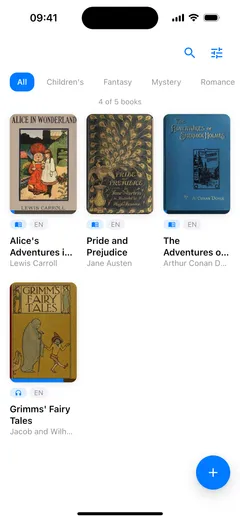
Fablum on iPhone browsing the Project Gutenberg OPDS catalog with cover previews
Project Gutenberg opens directly in the app, so browsing starts with books instead of setup steps.
Fablum on iPad showing a wider view of OPDS catalog browsing
On iPad, the same OPDS flow gets more breathing room without turning into a separate desktop-only experience.

How OPDS works in Fablum

The clearest way to explain the flow is to walk through it as it happens in the app. There are only three steps, but each one removes a common point of friction from older OPDS readers.

Step 1

Add a catalog

Tap the add button in your library and choose Browse Catalogs. Fablum opens Project Gutenberg directly inside a draggable sheet. That shortcut sounds small, but it gets rid of the dead time where many apps make you manage a catalog list before you can see a single book.

The sheet can expand when you are browsing and collapse when you want a quicker peek. If you add other OPDS feeds later, they fit into the same model instead of behaving like a separate browser bolted onto the side of the app.

Step 2

Browse and search

Move through categories inside the same sheet. If the feed supports search, the search field appears inline in the sheet header instead of sending you elsewhere. Covers are prefetched to make scrolling feel less jerky, and the app filters out Gutenberg entries that are audio-only so the list stays focused on books you can actually read in Fablum.

This is where OPDS either feels modern or feels ancient. When the browsing layer is good, you stop thinking about the protocol and just browse. When it is bad, OPDS feels like something only hobbyists should touch. Fablum aims for the first outcome.

Step 3

Download and read

Tap a book entry and Fablum fetches the available files in the background. If there are multiple options, you see them clearly instead of guessing from raw MIME types. When a catalog offers several EPUB variants, Fablum prefers EPUB3 first, then standard EPUB, then PDF. That keeps the best reading format up front without hiding the alternatives.

While the file is downloading, progress appears inline on the entry card. When the download finishes, the book lands in your library and behaves like any other import. At that point you are out of catalog mode and back in reading mode, which is exactly how it should be.

If you are deciding between OPDS readers, this is the checklist I keep coming back to:

  1. Can you open a real catalog quickly, without setup noise?
  2. Can you browse and search without leaving the app flow?
  3. Can you tell which file you are downloading before you commit?
  4. Does the book become a normal local book after download?

If the answer to any of those is no, the app may technically support OPDS, but it probably does not respect your time.

No single catalog covers everything, and that is part of the appeal. OPDS is useful because it lets you mix a giant public-domain archive, a more curated editorial catalog, and your own private collection inside one reader.

Catalog What you will find Best for Notes
Project Gutenberg Large public-domain collection across literature, essays, history, and reference Starting fast with free classics and long-tail discoveries Built into Fablum and easy to browse on a phone
Standard Ebooks Carefully proofread public-domain editions with stronger typography and metadata Readers who care about polished editions, not just raw access Curated catalog with its own feed-access rules depending on the collection
Feedbooks Public Domain Public-domain books in a smaller and often tidier catalog structure Browsing by genre when Gutenberg feels too broad Good complement to Gutenberg rather than a replacement for it
Calibre content server Your own books published as a personal OPDS feed Keeping a self-managed library reachable from your phone or tablet Useful when your OPDS reader also needs to be your personal library browser
Smaller niche OPDS feeds Language-specific, subject-specific, or community-run collections Finding catalogs that match your reading interests more closely Quality varies, but standard feeds tend to work well when the server is maintained

What matters most is not having the longest list. It is having a reader that makes trying a catalog feel cheap. If adding a new source is painless, you are much more likely to experiment. That is how OPDS becomes part of your reading life instead of a one-time import trick.

Why Fablum works well for OPDS readers

OPDS support on its own is not enough. The catalog matters, but the reason you download a book is to keep reading after the catalog disappears. That is where Fablum has a stronger argument than older OPDS utilities: it is a reader first, not just a feed browser.

Privacy-first - no account needed

You can browse a catalog, download a book, and start reading without creating an account. That should not feel unusual, but in book software it often does. Too many apps want a storefront identity, a sync account, or some kind of membership before they act like a reader. Fablum keeps the simpler contract: your library is yours, and the catalog is just one source for books.

That also changes how private the experience feels. Fablum is not promising a cloak-and-dagger fantasy here. It is promising something more useful: your book, your reading progress, and your organization stay on your device unless a network action is actually required.

Offline reading after download

This is the dividing line between a nice catalog demo and a usable OPDS reader app. Once a book finishes downloading, it should stop behaving like a remote object. In Fablum it lands in your local library, appears in search and sort, and stays available when you lose the network. That sounds obvious, but some apps still make downloads feel temporary or second-class.

The practical benefit is that discovery can happen online while reading happens offline. Browse at home, download on Wi-Fi, then open the book later on a train or plane as if you had imported it from Files in the first place.

Full EPUB and PDF support

A catalog is only as good as the reading experience that follows it. Fablum opens EPUB and PDF, remembers your place, and gives you the reading controls that matter after the download: themes, type controls, table of contents, and local progress. If you like listening as much as reading, the built-in text-to-speech guide covers how Fablum handles on-device playback after the book is already in your library.

That matters because OPDS often gets framed as a discovery feature, but the download is not the finish line. It is the handoff. The better the handoff, the less you think about file formats and the more you just keep reading.

The short version: a good OPDS reader should make catalogs easy to browse and then get out of the way. Fablum’s strength is that the second half is just as solid as the first.

Replacing KyBook? Here’s what to know

KyBook stayed popular for a reason. It handled local files seriously, supported OPDS, and gave people a level of control that many glossy bookstore apps never matched. If you have used it for years, you are probably not looking for a “social reading platform.” You are looking for a current app that still treats books like files you own.

As of April 17, 2026, KyBook 3’s App Store version history still ends at v0.7.8 from February 23, 2019. That does not erase what the app did well. It does mean you should evaluate it like abandoned software, not active software. A modern replacement needs to keep the parts people actually cared about: OPDS access, local storage, decent format handling, and a reading interface that does not fight the content.

That is the case for Fablum. Project Gutenberg opens directly. EPUB and PDF are handled in the same library. Downloaded books stay local. The app continues to improve, which matters because OPDS support ages badly when bugs or odd catalog cases go untouched for years.

There is more to say here than fits on one page, so I am treating this as the practical version rather than the encyclopedic one. A deeper what is OPDS explainer, a dedicated KyBook alternative migration page, and a free ebooks guide are all on the roadmap. For now, the useful question is narrower: if you want the OPDS part of the old workflow without inheriting abandoned software, does the new app handle the boring details well? That is where Fablum has the better answer.

Frequently asked questions

These are the questions people usually ask before they trust a catalog browser with their next download.

What is an OPDS catalog?

OPDS stands for Open Publication Distribution System. In practice, it is a catalog format that lets a reading app browse, search, and download books from an online library without sending you through a separate browser-and-files workflow.

Is OPDS free to use?

The format itself is free. Many OPDS catalogs, especially public-domain collections, are free to browse and download from. A few catalogs can have their own membership rules or paid content, so the catalog's policy still matters.

How do I add an OPDS catalog to Fablum?

Fablum opens Project Gutenberg directly from the library add menu. For other catalogs, enter the feed URL when you want to add a custom OPDS source.

Can I read OPDS books offline?

Yes. Once a book has finished downloading into your library, it behaves like any other local book in Fablum. You can open it later without an internet connection.

Which file formats can I download from OPDS catalogs?

Fablum looks for EPUB and PDF downloads. When a catalog offers more than one EPUB variant, Fablum prefers EPUB3 first, then standard EPUB, then PDF if that is the best option available.

Is KyBook still updated?

As of April 17, 2026, KyBook 3's App Store version history still ends at v0.7.8 from February 23, 2019. That is why many long-time OPDS users now look for a more current replacement.

Does Fablum work with Calibre's OPDS server?

Yes, if your Calibre content server exposes a standard OPDS feed. That makes Fablum useful both for public catalogs and for your own personal library.