On-device listening with live highlighting

Text-to-Speech E-book Reader — Listen to Any EPUB

Fablum is a text-to-speech ebook reader for EPUB books with adjustable speed, voice selection, and live word highlighting. Playback stays on your device, works offline, and does not need an account.

Text to speech ebook reader is one of those search phrases that sounds simple until you try the apps behind it. Plenty of tools can speak text. Far fewer can open a real EPUB, start from the paragraph you are already on, keep the spoken word synced with the page, and keep working when you are offline. Fablum is built for that second job. It is a full reader first, so text-to-speech stays inside the same reading flow instead of sending you into a separate export, conversion, or browser-extension routine.

If you want the broader product picture, the homepage walks through the reader, library, and privacy approach. If you are using public-domain catalogs to find books to listen to, the OPDS guide covers the other half of the loop: discover a book, download it, then keep listening inside the same app.

How text-to-speech works in Fablum

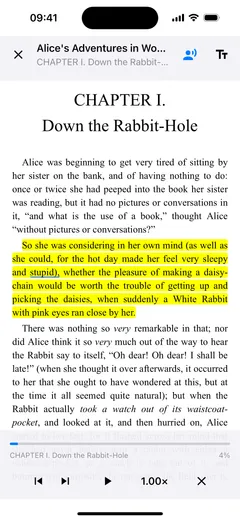
The basic flow is deliberately short. Open an EPUB, tap the text-to-speech button in the reader, and Fablum starts narrating from the current visible position. The playback controls take over the bottom bar, so you can move to the previous sentence, pause, or jump ahead without leaving the page. That part matters because many “read aloud” features feel detached from reading itself. They can speak, but they do not help you stay oriented.

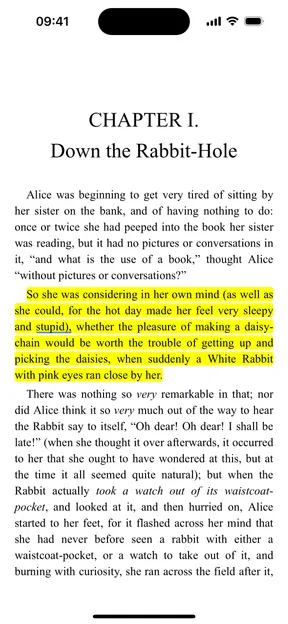
Fablum keeps the visual and spoken layers tied together. The current sentence is highlighted in yellow, the active word gets a blue underline, and the controls stay visible during playback instead of vanishing on an auto-hide timer. If you pause because someone interrupts you, you do not come back to a blank screen and have to guess where the controls went. If you stop playback and return later, the app remembers your speed and voice settings. If you turn TTS off and on again on the same page, it resumes from the last sentence it read. If you have moved to a different page in the meantime, playback starts from the text you are actually looking at now.

Near the top of the experience, there are four practical reasons this works better than the usual “nice to have” implementation:

  1. It starts from the visible reading position instead of forcing a restart from the chapter top.
  2. It gives you quick speed changes and a deeper settings sheet without making you leave the reader.
  3. It keeps sentence and word tracking visible, so listening and reading stay connected.
  4. It relies on on-device speech, which means no account gate and no internet requirement for playback.

Adjustable speed and voice selection

Most people do not listen to every kind of book at the same pace. Dense history or philosophy often needs a slower cadence. Familiar fiction can tolerate a quicker rhythm. Fablum handles that in two layers. In the bottom bar, the speed button cycles through the common presets: 0.5x, 0.75x, 1.0x, 1.25x, 1.5x, and 2.0x. That covers the quick adjustment you make in the middle of a reading session when the current chapter feels too fast or too sleepy.

There is also a continuous slider in the settings sheet for finer control. That matters when you are sitting between the presets and want the voice to feel natural rather than merely slower or faster. Fablum saves that preference, so you are not recalibrating every time you reopen the book. The same settings sheet exposes the voice picker. Voices are grouped by language, which keeps the list readable on a phone and makes it easy to switch when you read across more than one language or simply prefer a different system voice for longer sessions.

One small detail that is easy to miss but makes the feature feel mature: the settings are available whenever TTS is supported for the current EPUB. You do not have to begin playback first just to reveal the controls. Choose the voice or speed you want, then start listening when you are ready.

Word-level highlighting as you listen

Good TTS is not only about the sound. It is about orientation. When the reader keeps the spoken text visibly anchored to the page, you can dip in and out of full attention without losing your place. Fablum highlights the current sentence in yellow and underlines the active word in blue, so the app is always answering the silent question: where exactly am I right now?

That turns out to matter in a range of everyday situations. It helps when you are alternating between reading with your eyes and listening while you walk. It helps when you want to catch a difficult paragraph twice, once by ear and once by sight. It helps when you are using TTS for proofreading or for reading in a second language and need the spoken pace and the written words to stay aligned. Because the controls remain on screen during playback, the whole experience feels like an active reading mode instead of background audio with a static book attached to it.

Works offline — no internet needed

This is where Fablum separates itself from many modern TTS products. Playback uses the speech synthesis already available on the device. That means there is no requirement to upload chapters to a cloud service, no dependence on a live connection, and no separate account just to have the page spoken aloud. Once the book is on your device and the system voice you want is installed, you can listen in airplane mode, on a train, in the subway, or anywhere else signal is annoying or unavailable.

Offline support is not only about convenience. It changes whether a feature is something you rely on or something you treat as fragile. A reader that only works when the network is behaving becomes one more subscription surface. A reader that speaks locally becomes part of the book itself. That is the version Fablum is aiming for.

Fablum on iPhone reading an EPUB aloud with playback controls and word highlighting visible
Playback stays tied to the page: visible controls below, the current sentence highlighted, and the active word marked in place.

Why on-device TTS matters for privacy

The privacy angle is not theoretical. A lot of mainstream TTS software is built around accounts, subscriptions, AI voice quotas, web apps, or cloud conversion flows. That can be useful for voiceover production or for turning a stack of documents into downloadable audio files, but it is a different product assumption. You are no longer just reading a book on your phone. You are routing text through a service.

Fablum takes the opposite route. The spoken playback uses the voices already on the device, so your reading session does not need a remote processing step. The book can stay local. The narration can stay local. Your preferences can stay local. That lines up with the rest of the product: no account required, no forced storefront, and a reading flow that still functions when the network is gone.

For some people, that is just cleaner. For others, it is the difference between using TTS casually and trusting it with the books they actually care about. Sensitive nonfiction, personal documents, medical reading, niche research, or just books you would rather keep unremarkable do not need to become one more upload pipeline. The broader Fablum experience is built around that same principle: make reading useful first, then keep it private by default.

Fablum vs other TTS readers

Most comparison pages talk about TTS as if every listener wants the same thing: the most human-sounding voice, the fastest speed, the biggest AI voice catalog. That is one market. Another market is people who want a dependable mobile reader that can open an EPUB, stay offline, and keep the spoken text visibly anchored to the page. Fablum belongs to the second category.

The table below focuses on that practical reading use case. Pricing and plan structure change often, so this is a feature-and-pricing-model snapshot based on official product pages and App Store listings checked on April 17, 2026.

App Speech approach Offline listening Privacy posture EPUB reading support Pricing model
Fablum On-device system voices inside the reader Yes No account required for playback; reading stays on device Full EPUB reader with synced sentence and word tracking Reader-first app, not a separate TTS subscription surface
NaturalReaders Mix of system voices and cloud-style AI voice plans Varies by voice and plan Account-and-plan oriented service with web, mobile, and extension workflows Supports EPUB, but not as a focused reader app in the same way Subscription tiers for the personal app
Speechify Premium cloud-style voice service with mobile and browser workflows Limited offline options inside premium plans Account-centric service designed around premium voice access Can import documents, but reading is secondary to the TTS layer Free tier plus premium subscription
Voice Dream Dedicated TTS app with strong offline voices and document support Yes More local-first than cloud-first, with optional sync and subscription upsell Strong EPUB support, especially for accessibility-heavy workflows Subscription and in-app purchase mix

What that table really shows is product shape. NaturalReader and Speechify are powerful if your goal is audio generation across documents and services. Voice Dream is still a serious accessibility-first reading tool. Fablum is for the person who wants privacy, offline playback, EPUB reading, and book discovery in the same calm app. If part of your workflow is finding public-domain titles before listening, the OPDS page is the other half of that story.

Supported formats and languages

Today, text-to-speech in Fablum is an EPUB feature. That is the format where the app can follow the text structurally, keep the current sentence aligned, and move through the spoken content in a way that still feels like reading. PDFs are supported in the library and reader, but spoken playback is not part of the current PDF flow. That is worth stating plainly because a lot of apps bury format differences until after you import a file.

Language support is tied to the voices the device already offers. In practice, that means the range is broader than a fixed in-app voice catalog. If your phone or tablet exposes system voices for the language you read in, Fablum can surface them in the voice picker. The list is grouped by language so you do not have to scroll through one long flat inventory. If the device is missing voice data for the book’s language, Fablum prompts you instead of failing silently.

That approach also keeps the feature honest about voice quality. Fablum is not pretending to be its own synthetic-voice lab. It is giving you a clean reading layer on top of the voices already available to your operating system. For many people, that is the right trade: better privacy, better reliability, and less friction. For people who want the newest premium AI voices at any cost, there are other tools. Fablum is more interested in making sure the everyday act of listening to an EPUB feels steady, local, and easy to resume.

Frequently asked questions

What e-book reader has text to speech?

Fablum has built-in text-to-speech for EPUB books. It starts from your current reading position, uses the voices already installed on your device, and keeps playback on-device instead of routing text through a cloud account.

Can you listen to EPUB books?

Yes. Fablum can read EPUB books aloud with sentence and word tracking, speed controls, and voice selection. You start from inside the reader, so listening feels like part of reading rather than a separate export workflow.

Does Fablum text-to-speech work offline?

Yes. Fablum uses your device's built-in speech synthesis, so playback works without an internet connection once the book is already on your device and the relevant system voice is installed.

Can I change the reading speed?

Yes. Fablum offers tap-to-cycle speed presets from 0.5x to 2.0x, plus a continuous slider in the settings sheet for more precise control. The preference is saved for the next session.

Can I choose different voices?

Yes. Fablum shows the system voices available on your device, grouped by language. Pick a different voice in settings and the change applies as soon as playback starts or resumes.

Does Fablum support text-to-speech for PDF files?

Not at the moment. In Fablum today, text-to-speech is available for EPUB books. PDF reading is supported, but spoken playback is not enabled because the current TTS flow is built around EPUB text navigation.